Smartphones have become an essential part of everyday life, helping people stay connected, enjoy entertainment, attend online meetings, and browse the internet. However, low speaker volume is a common problem that can make these activities less enjoyable.
Whether you are watching videos, listening to music, playing games, or making hands-free calls, a quiet speaker can be frustrating. Fortunately, several practical methods can help improve your phone’s volume and sound quality without risking unnecessary damage.
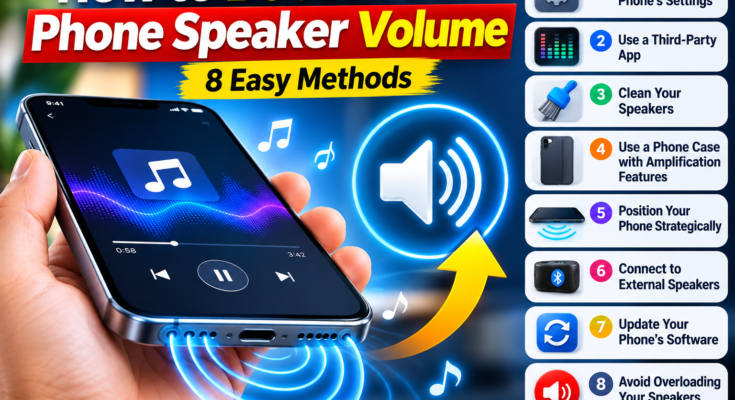
In this guide, we will explore eight effective ways to make your phone speaker louder, improve audio clarity, and troubleshoot common sound problems.
1. Check Your Phone’s Sound Settings
Before downloading additional applications or purchasing accessories, start by checking your smartphone’s built-in audio settings. Some devices offer sound-enhancement features that can improve the listening experience.
Adjust the Equalizer
An equalizer allows you to adjust different audio frequencies, including bass, midrange, and treble. Depending on your phone and the content you are playing, changing these settings may make music and videos sound clearer.
Avoid increasing every frequency to its maximum level, as excessive adjustments can introduce distortion and reduce sound quality.
Enable Mono Audio When Needed
Mono audio combines the left and right audio channels into a single channel. This feature can help when audio is difficult to hear because of an uneven channel balance or when using a single speaker or earphone.
However, mono audio does not normally increase the physical loudness of your phone’s speaker.
Check Volume Restrictions
Some smartphones include media-volume limits or hearing-protection settings. Check your sound settings to see whether a restriction is enabled.
If an adjustable limit is available, you can change it according to your needs and hearing-safety preferences.
2. Try a Volume Booster or Equalizer App
Third-party audio applications can provide additional controls for improving sound quality. Some offer equalizer presets, bass adjustments, and audio effects that may make supported content sound louder or clearer.
Popular options include:
- VLC Media Player: Offers audio controls and equalizer features for supported media playback.
- Poweramp: Provides advanced audio customization for music playback.
- Equalizer FX: Offers equalizer controls and audio effects on compatible devices.
The available features depend on your phone, operating system, and the application version.
Keep in mind that a software booster cannot overcome the physical limitations of your phone’s speaker. Excessive amplification may cause distortion and make the audio unpleasant to hear.
For safety, download applications from trusted sources, review their permissions, and avoid apps that request unnecessary access to your personal information.
3. Clean Your Phone’s Speaker Carefully
Dust, lint, and debris can collect around speaker openings over time. This buildup may reduce sound clarity and make audio seem quieter than usual.
To clean your speaker safely:
- Use a clean, soft, dry brush to remove loose dust gently.
- Keep sharp objects away from the speaker grille.
- Avoid inserting cotton swabs or other objects deeply into the opening.
- Do not pour liquids or cleaning solutions into the speaker.
- Avoid directing high-pressure compressed air into the speaker.
- Follow the manufacturer’s cleaning instructions, especially if the phone has been exposed to water.
If the speaker remains muffled after cleaning, there may be moisture inside the device or a hardware problem that requires professional inspection.
4. Use a Phone Case That Does Not Block the Speaker
A poorly fitted phone case can partially cover the speaker openings, reducing perceived volume or affecting sound clarity.
Check whether your case is aligned correctly with the speaker grille. If the openings are obstructed, try removing the case temporarily and compare the sound.
If the volume improves, consider replacing the case with one designed specifically for your phone model.
A suitable case can prevent obstruction, although it will not necessarily increase the speaker’s actual output beyond its normal capability.
5. Position Your Phone Correctly
The way you position your smartphone can influence how loud the sound appears.
Place It on a Hard Surface
A flat, hard surface can reflect some sound toward the listener, making the audio seem more noticeable in certain situations.
Avoid Soft Surfaces
Beds, blankets, cushions, and sofas can absorb sound or cover the speaker openings. Keeping the phone away from these materials may improve audibility.
Direct the Speaker Toward You
Position the phone so that the speaker openings are not pointing away from you or obstructed by your hand.
These simple adjustments can improve the listening experience without increasing the phone’s electronic volume.
6. Connect an External Speaker
If your phone’s built-in speaker is not loud enough, an external speaker is often the most effective solution.
Bluetooth Speakers
Bluetooth speakers are available in different sizes and price ranges. Many portable models deliver louder audio and stronger bass than a smartphone’s built-in speaker.
They can be useful for listening to music, watching videos with friends, or enjoying entertainment outdoors.
Wired Speakers
Compatible wired speakers can also provide improved sound output. Depending on your phone, you may need a USB-C adapter, a headphone connection, or another supported audio interface.
Before purchasing an accessory, confirm that it works with your device.
For large rooms, gatherings, or outdoor activities, an external speaker is generally more effective than attempting to push a small smartphone speaker beyond its intended limits.
7. Update Your Phone’s Software
Outdated software can sometimes contribute to audio problems. Operating-system updates may include bug fixes, compatibility improvements, or changes to audio processing.
To check for updates:
- Open your phone’s Settings.
- Find Software Update or System Update.
- Check whether an update is available.
- Follow the instructions to install it, if appropriate.
You can also update your media applications through the official app store.
If the speaker became unusually quiet immediately after a software update, restarting your phone and checking the sound settings may help identify the problem.
8. Avoid Excessive Volume and Troubleshoot Persistent Problems
Increasing volume beyond a speaker’s capabilities can introduce distortion without producing a meaningful improvement in sound quality.
For clearer audio, use an appropriate volume level and avoid unnecessary amplification.
If your phone suddenly becomes much quieter than normal, investigate the possible cause rather than immediately installing a booster application.
Common causes include:
- Dirt or debris blocking the speaker grille
- A phone case obstructing the speaker
- Incorrect sound settings
- An application-related audio issue
- Moisture exposure
- Physical damage to the speaker
Try restarting your phone, checking the volume settings, testing different audio sources, and inspecting the speaker openings.
If the problem persists, especially after water exposure or physical damage, consult an authorized service center.
Final Thoughts
Making your phone speaker louder does not always require additional hardware. Checking audio settings, cleaning the speaker carefully, removing obstructions, positioning the phone correctly, and using appropriate equalizer controls can all help improve the listening experience.
If you need substantially louder sound, a compatible external Bluetooth or wired speaker is usually the most practical choice.
Start with the simple solutions first, avoid excessive software amplification, and keep your phone’s speaker openings clean. These steps can help you enjoy clearer audio while protecting your device and your hearing.
Frequently Asked Questions
How can I make my phone speaker louder without an app?
Check your media-volume settings, clean the speaker grille carefully, remove any obstructing case, and position the speaker toward you. These methods may improve audibility without additional software.
Do volume booster apps really work?
Some applications can increase perceived loudness through audio processing, but results vary by device. Excessive amplification can cause distortion and cannot overcome the physical limits of a speaker.
Why is my phone speaker suddenly quiet?
Possible causes include blocked speaker openings, incorrect settings, software problems, moisture, or hardware damage. If basic troubleshooting does not help, professional inspection may be necessary.
Does cleaning the speaker improve sound quality?
Yes, if dust or debris is obstructing the speaker grille. Clean it gently using the manufacturer’s recommended method and avoid inserting objects into the opening.
What is the best way to get louder phone audio?
For a small improvement, check the settings and remove obstructions. For a substantial increase in volume, a compatible external speaker is generally the better option.