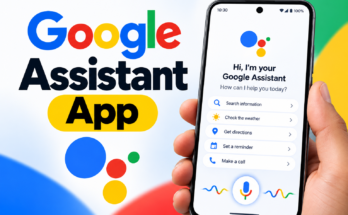
As artificial intelligence continues to evolve, voice assistants have become an important part of modern technology. Google Assistant combines voice recognition, language understanding, and integration with Google services to help users complete tasks quickly and efficiently.
What Is Google Assistant?
Google Assistant is a virtual assistant that enables users to control supported devices and access information through voice or text commands. It works with compatible Android smartphones, Google services, and various connected devices.
Some of its main capabilities include:
- Sending text messages
- Making phone calls
- Opening applications
- Searching for information online
- Setting alarms and reminders
- Playing music and videos
- Finding locations and directions
- Controlling compatible smart-home devices
For example, you can say:
“Hey Google, what’s the weather today?”
“Hey Google, open YouTube.”
“Hey Google, remind me to call my friend at 6 PM.”
Google Assistant processes supported requests and responds with relevant information or performs the requested action when available.
Key Features of Google Assistant
Google Assistant offers several useful features that can simplify daily activities and improve the smartphone experience.
1. Voice Control for Smartphones
One of the most useful features of Google Assistant is voice-based control. Users can perform supported actions without physically touching their phones.
You can use voice commands to make calls, send messages, open applications, and access other functions. This feature is particularly helpful when your hands are occupied or you need quick access to a smartphone feature.
2. Instant Access to Information
Google Assistant helps users find information about a wide range of subjects, including weather forecasts, general knowledge, sports, and directions.
Its integration with Google’s services allows users to access relevant information through simple questions rather than typing lengthy searches.
For example, you can ask about the weather, request directions to a destination, or search for answers to general questions.
3. Smart Home Device Control
Google Assistant can connect with compatible smart-home devices, including smart lights, televisions, speakers, and other connected products.
Users can issue voice commands such as:
“Hey Google, turn off the lights.”
“Hey Google, play music on the TV.”
The available functions depend on the connected device, its compatibility, and the user’s configuration. When properly set up, voice control can make managing a smart home easier and more convenient.
4. Alarms, Reminders, and Scheduling
Managing daily responsibilities becomes easier when users can create reminders and alarms through voice commands.
Google Assistant supports various scheduling tasks, depending on the device and available services.
For example:
“Hey Google, set an alarm for 7 AM.”
“Hey Google, remind me to drink water every hour.”
These features can help students, professionals, and other users remember important activities and maintain an organized routine.
5. Navigation and Directions
Google Assistant can work with Google Maps to help users find destinations and navigate unfamiliar locations.
Users can request directions, search for nearby places, and access supported navigation features through voice commands.
For example:
“Hey Google, find the nearest restaurant.”
The assistant can help locate nearby businesses and provide navigation assistance when the necessary services and permissions are available.
How to Get Google Assistant on Your Smartphone
Many Android smartphones include Google services and may support Google Assistant or other Google AI assistant experiences. Availability depends on the device, operating system, region, language, and Google’s current product support.
To check whether Google Assistant is available on your smartphone, follow these general steps:
- Open the Google Play Store.
- Search for the official Google app or the relevant supported assistant application.
- Install or update the application if necessary.
- Open the Google app and check the available assistant settings.
- Sign in to your Google account if prompted.
- Follow the on-screen instructions to configure supported voice features.
On compatible devices, you may be able to activate voice interaction by saying “Hey Google” after enabling the relevant setting.
Important: Google has been expanding its AI assistant offerings, including Gemini, which is replacing Google Assistant in some experiences. Therefore, the available assistant and setup process may differ depending on your smartphone and Google’s current rollout.
Benefits of Using Google Assistant
Google Assistant offers several practical advantages for everyday smartphone users.
Saves Time: Users can perform common tasks through voice commands instead of navigating through multiple menus.
Hands-Free Convenience: Voice interaction can be useful while cooking, working, or performing other activities. However, users should avoid interacting with their phones while driving unless it can be done safely and legally.
Improved Organization: Alarms, reminders, and supported calendar functions can help users manage appointments and daily responsibilities.
Smart Device Integration: Compatible connected devices can be controlled through voice commands, making everyday home activities more convenient.
Easy Access to Services: Integration with Google applications can simplify tasks such as navigation, information searches, and media playback.
How Google Assistant Can Help in Everyday Life
Google Assistant can support people with different needs and routines.
For Students
Students can use voice commands to set study reminders, create alarms, check information, and organize their schedules. These features can make it easier to manage study sessions and remember assignments.
For Professionals
Professionals may find voice interaction useful for setting reminders, checking directions, managing supported calendar events, and performing routine smartphone tasks.
For Home Users
At home, users can control compatible smart devices, play entertainment, check information, and manage certain everyday activities using voice commands.
The usefulness of these features depends on the applications, services, and devices available to each user.
Privacy and Security Considerations
Privacy is an important factor when using any AI-powered voice assistant. Google provides account and device settings that allow users to manage certain aspects of their activity and personal information.
Depending on the device, account configuration, and available controls, users may be able to review activity history, manage voice-related data, and delete stored activity.
For better privacy management, users should:
- Review their Google account privacy settings regularly.
- Check which applications and services have microphone permissions.
- Review available voice and activity controls.
- Delete stored activity when appropriate.
- Understand how their chosen assistant handles requests and personal information.
These steps can help users make informed decisions about their privacy while using voice-assistant technology.
The Future of Google Assistant and AI Assistants
Artificial intelligence is changing how people interact with smartphones and digital services. Modern AI assistants are increasingly designed to understand natural language, respond to complex requests, and work across supported applications.
Google’s AI assistant ecosystem is also evolving, with Gemini taking on many tasks previously associated with Google Assistant.
Future developments may improve conversational abilities, task automation, application integration, and interactions with connected devices. However, specific capabilities will depend on product development, device compatibility, and regional availability.
Final Thoughts
Google Assistant has made smartphone interaction more convenient by allowing users to perform supported tasks through voice commands. Its features include information searches, reminders, alarms, navigation, and integration with compatible smart-home devices.
Whether you are a student, professional, or everyday smartphone user, a digital assistant can help simplify routine activities and reduce the need for manual interaction.
As Google’s AI technology continues to develop, users can expect changes in how assistant features are delivered across compatible devices. Checking the latest availability and settings for your smartphone is the best way to understand which features you can use.
Download or explore Google Assistant: Search for Google Assistant on Google Play